
Ultimate guide: How to sit correctly in front of the computer
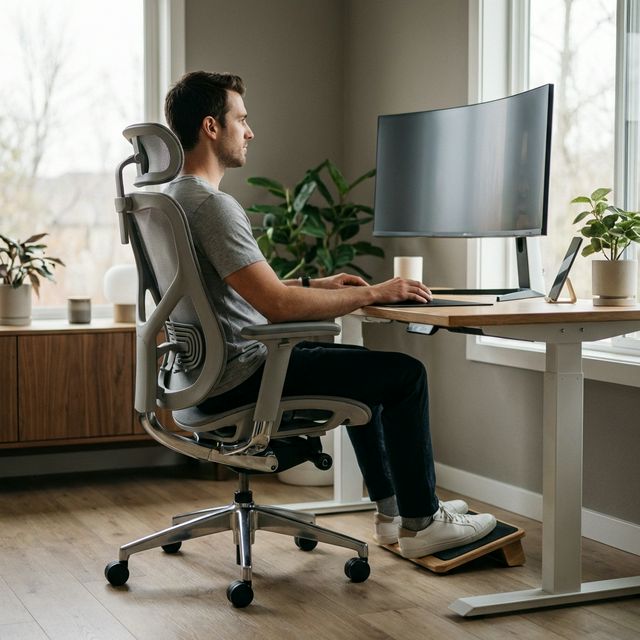
1. The "completely straight back" myth
Since childhood we've been told "sit up straight!". However, modern ergonomics has proven that forcing a military posture with a rigid spine at exactly 90 degrees is not healthy. It is called an active forced posture and quickly fatigues the paravertebral muscles.
The occupational health standard supported by organizations like the National Institute for Safety and Health at Work advocates for a "neutral posture". This implies maintaining the natural curvature of the spine (in the shape of a subtle 'S') reclining the backrest slightly backward, ideally between 100 and 110 degrees.
2. Checklist: The 4 key support points
To effortlessly achieve this neutral posture, you should review your anatomy from the bottom up:
- Feet firmly planted: Both feet must rest completely on the floor or on a footrest. Never hanging.
- Knee curve: Between the seat of your chair and the back of your knees (the popliteal fold), there should be two to three fingers of space to avoid cutting off circulation.
- Pelvis at the back: Your buttocks should touch the back of the chair's backrest. Sitting "on the edge" ruins lumbar support.
- Elbows at 90 degrees: Your forearms should rest on the armrests or the table parallel to the floor, without your shoulders shrugging towards your ears.
3. The 3 most common postural mistakes at home
Working without ergonomic supervision we often fall into harmful habits:
- Crossing legs: Misaligns the pelvis and compresses leg veins.
- The "turtle posture": Bringing your head closer to the screen. Every centimeter the head advances relative to the trunk adds several kilos of tension to the cervicals.
- The "air click": Using the mouse with an extended arm without resting the forearm on the table, overloading the trapezius.
4. How to configure your work environment
Follow this strict order next time you sit down:
First, adjust the height of the chair so that your elbows are at table height. Second (and not before), evaluate whether your feet touch the ground. If they don't reach, put down a strong box, books, or a footrest. Finally, raise the laptop screen or monitor until the top edge is at eye level.
5. Transforming a basic chair into an ergonomic one
We cannot always assum the cost of investing 800€ in a chair like Herman Miller. If you use a kitchen chair or a basic desk chair that loses its padding after two hours, we suggest using viscoelastic supplements that mimic the density of premium chairs.

Feagar Memory Foam
Nº1 for adapting any flat chair